
 Information for administrators
As an administrator, you can control which incoming calls reach your organisation and which outgoing calls can be made from your organisation.
About call screening
You can set up call screening rules for blocking or accepting calls of a selected type, or from selected phone numbers.
You need to specify the days and times that each rule applies to. You can create lists of numbers that the rules apply to. You can add individual phone numbers to the screening rules, or ranges of numbers starting with a defined sequence of digits.
Managing call screening rules
To create a new call screening rule
For administrators only
- Select Management > Call Management.
- In the Call screening section, select View all.
- Select .
- If you want to create a rule to block calls, select Block.
Or
If you want to create a rule to accept calls, select Allow.
- Enter a descriptive name for the rule.
- If you want the rule to apply to everyone in the company, in the Targets section, select All Company's terminals. This option is available only to company administrators.
Or
If you want the rule to apply to selected phone numbers, in the Targets section, select A set of terminals. You can then select the groups, users or phone numbers the rule applies to.
- Select Next.
- In the Call Screening Rules section, select which incoming and which outgoing calls the rule applies to.
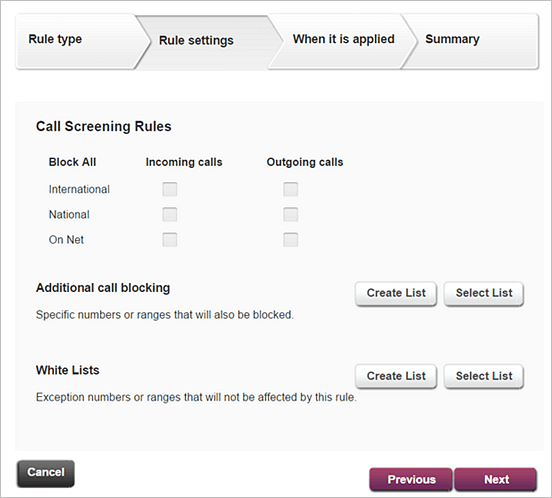
- If you want the rule to apply to additional, selected phone numbers, use the Additional call blocking section.
- Select to create a new call screening list for the rule.
- Select to select an existing call screening list for the rule.
- If you want to add exceptions from the rule, use the White Lists section.
- Select to create a new list of exceptions.
- Select to select an existing list of the exceptions.
- Select Next.
- In the When it is applied section, select days and times when the rule is active and then select Next.
- Select at the bottom of the page.
When you create a new rule, it automatically becomes active.
To view, edit or delete a call screening rule
For administrators only
- Select Management > Call Management.
- In the Call screening section, select View all.
- In the Rules section, select
 ,
,  or
or  next to the rule you want to view, edit or delete.
Managing screening lists
You can use screening lists when you're creating call screening rules or adding exceptions to the rules. Screening lists can contain whole phone numbers or ranges of numbers, such as numbers beginning with 0115.
To create a new screening list
For administrators only
- Select Management > Call Management.
- In the Call screening section, select View all.
- Select .
- Enter a descriptive name for the screening list.
- In Numbers begins with enter a phone number or initial digits of a range of phone numbers you wish to add to the list.
- If you want to add multiple phone numbers or ranges of numbers, select Add for each phone number or range of numbers you want to add to the list.
- Select Create.
Comments
0 comments
Please sign in to leave a comment.