
 Information for administrators
About speed dial numbers
Speed dial numbers are two-digit numbers that you can dial instead of full phone numbers or short numbers. You can use your speed dial numbers on any of your devices, including your desk phone or mobile phone, or a device that's running One Net Mobile Client.
There are two types of speed dial numbers:
- Personal speed dial numbers that are managed by the owner or an administrator and can be used only by the owner
- Company speed dial numbers that are managed only by administrators and can be used by everyone in the company
Read about using speed dial numbers >
Managing company speed dial numbers
Administrators can manage speed dial numbers that are available to everyone in the company.
To view company speed dial numbers
- Select Apps > Speed Dial > Company.
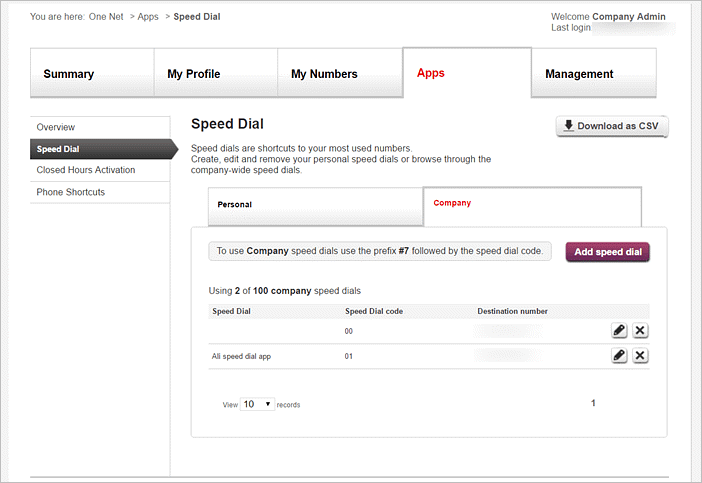
To add a company speed dial number
Information for company administrators- Select Apps > Speed Dial > Company.
- Select .
- Select a two-digit number to be used as the speed dial number.
You can use numbers from between 00 and 99.
- Enter a phone number or select a number from the address book.
- Select .
 You can have up to 100 company speed dial numbers.
To edit or delete a company speed dial number
Information for company administrators- Select Apps > Speed Dial > Company.
- Select
 or
or  next to the speed dial number you want to edit or delete.
Downloading speed dial numbers as a CSV file
You can download a CSV (comma-separated values) file with all company speed dial numbers.
To download a CSV file with company speed dial numbers
-
Access One Net Feature Management Portal.
- Select Apps > Speed Dial > Company.
- Select Download as CSV at the top of the page.
Comments
0 comments
Please sign in to leave a comment.