
About call pickup groups
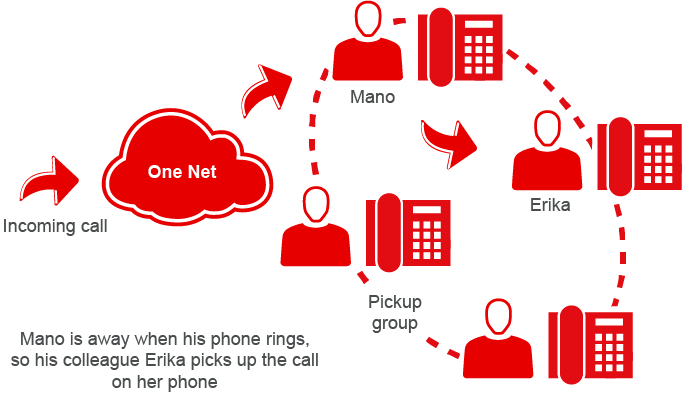
Members of a call pickup group can answer each other's calls from their own phones, or from One Net Operator Console and One Net miniClient. Call pickup groups are useful for teams or office areas where users are working together. If users can see when their colleagues are away or busy, they can answer their calls for them. Call pickup groups are created within organisational groups.
Learn how to answer calls in a call pickup group >
Managing call pickup groups
 Vodafone has to enable call pickup for a user before they can pick up other users' calls.
 Information for administrators
You can create as many call pickup groups as you need. Each user can only belong to one group. A call pickup group can only have the members of the same organisational group.
For administrators only
- Select Management > Users & Groups.
- In the Group Management section, select Manage.
- In the Call Pickup Groups section, select Manage.
- Select .
- In the Group Settings section, choose the organisational group that will host the call pickup group and enter a name for the call pickup group.
- In the Add Members section, select the users who will be members of the pickup call group.
A user can only be a member of one call pickup group. If you select a user who is already a member of another call pickup group, they will be removed from their current group.
- In the Summary section, review the settings you've selected and select .
For administrators only
- Select Management > Users & Groups.
- In the Group Management section, select Manage.
- In the Call Pickup Groups section, select Manage.
- Find the call pickup group you want to manage and select
 .
. - Select Edit.
- In the Group Members section, select Add Member.
- Search for users you want to add to the call pickup group or select the users from the users list.
A user can only be a member of one call pickup group. If you select a user who is already a member of another call pickup group, they will be removed from their current group.
For administrators only
- Select Management > Users & Groups.
- In the Group Management section, select Manage.
- In the Call Pickup Groups section, select Manage.
- Find the call pickup group you want to manage and select .
- Select Edit.
- In the Group Members section, select the users you want to remove and select Move Member.
- Select the group to move the user to and select Move Member.
For administrators only
- Select Management > Users & Groups.
- In the Group Management section, select Manage.
- In the Call Pickup Groups section, select Manage.
- Find the call pickup group you want to delete and select .
- Select Delete.
The users from the group can be added to other call pickup groups if required.
Comments
0 comments
Please sign in to leave a comment.