
You can manage how your numbers are presented on calls or set up speed dial numbers.
Managing your caller ID
When you make a call, your name and phone number can be displayed to people who have caller identification features on their phones. You can select how your caller ID is displayed when you make calls.
Managing your speed dial numbers
Speed dial numbers are two-digit numbers that you can dial instead of full phone numbers or short numbers. You can use your speed dial numbers on any of your devices, including your desk phone or mobile phone, or a device that's running One Net Mobile Client.
Read about speed dial numbers >
Viewing your short numbers
Short numbers are numbers associated with phone numbers. You can dial short numbers instead of full phone numbers when calling other users or company numbers. Short numbers are sometimes called prefixes or extensions and can be used to transfer calls in One Net Operator Console.
To view the short number for your phone number
-
Access One Net Feature Management Portal.
- Select My Numbers > My Numbers List.
The list of your phone numbers is displayed.
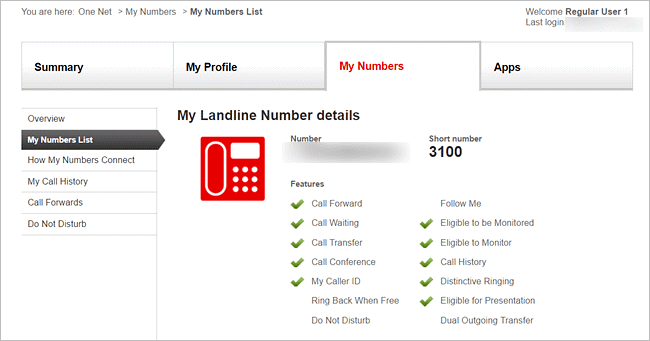
- Select View More for the phone number you want to view the short number for.
The short number is displayed at the top of the page, next to your phone number.
To view short numbers for other phone numbers
-
Access One Net Feature Management Portal.
- Select Apps > Address Book.
The short number is displayed in the Terminal short number column.
Comments
0 comments
Please sign in to leave a comment.